
Free browser extension
The Tech Peace Online Companion
Install it once and get two kinds of help as you browse: a quiet warning if a page looks like a scam, and a patient helper that reads whatever you're looking at and gives you plain, numbered steps whenever you ask.
- Warns you about scam & phishing pages
- Plain-language, step-by-step help
- Free for every Tech Peace member
- Silent until you ask — never a pop-up on a safe page
Two features, one purpose
Help feeling safe and capable on any page you visit
Everything the Online Companion does is in service of one thing: helping Tech Peace members use the web safely and independently, wherever they happen to be browsing.
Scam & phishing protection
Runs quietly in the background. Most pages are checked instantly on your own device and nothing happens — no pop-up, no interruption. If a page shows real warning signs of a scam, you'll see a non-blocking banner explaining why in plain language, never a blocking screen that stops you from using the page.
Online Companion chat
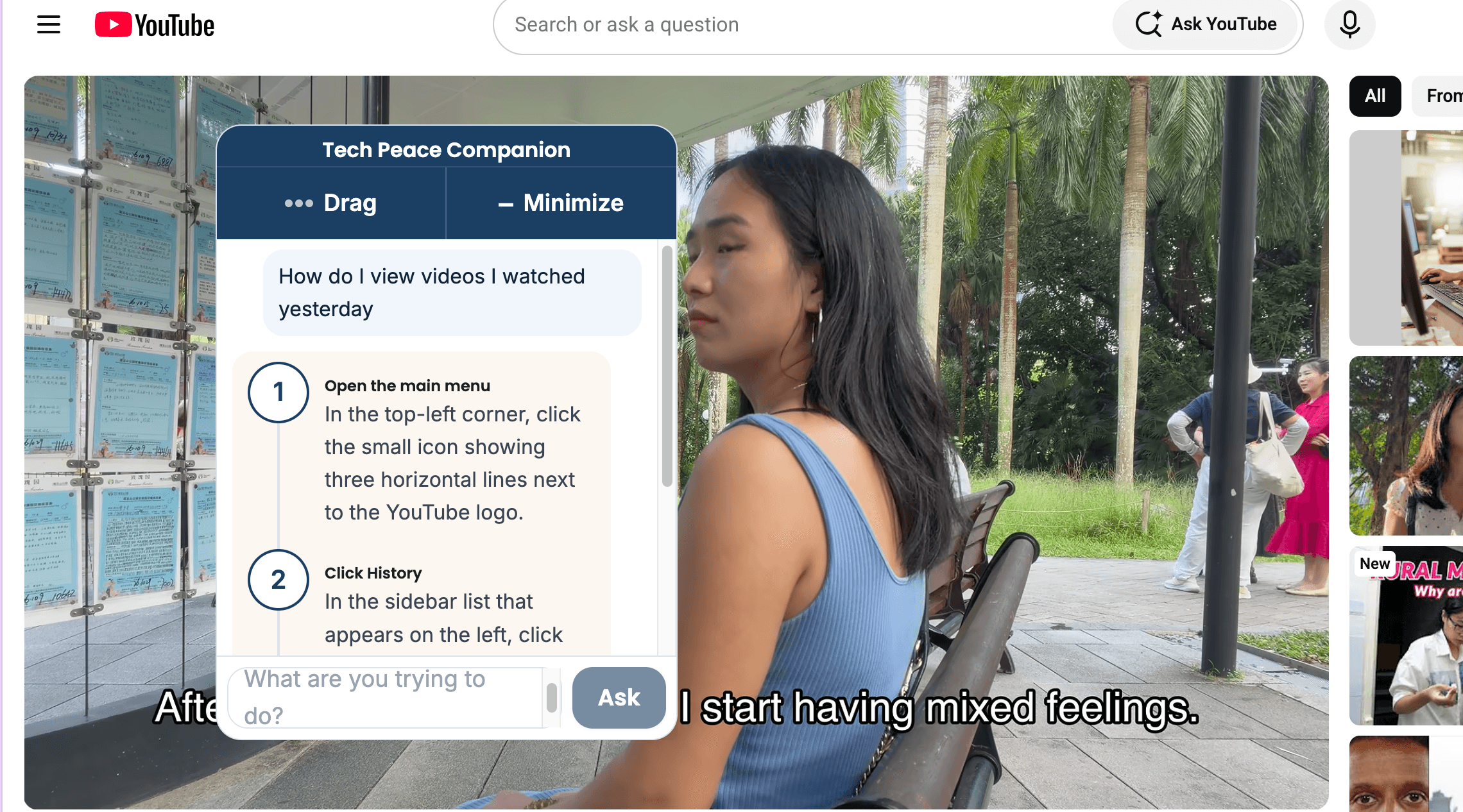
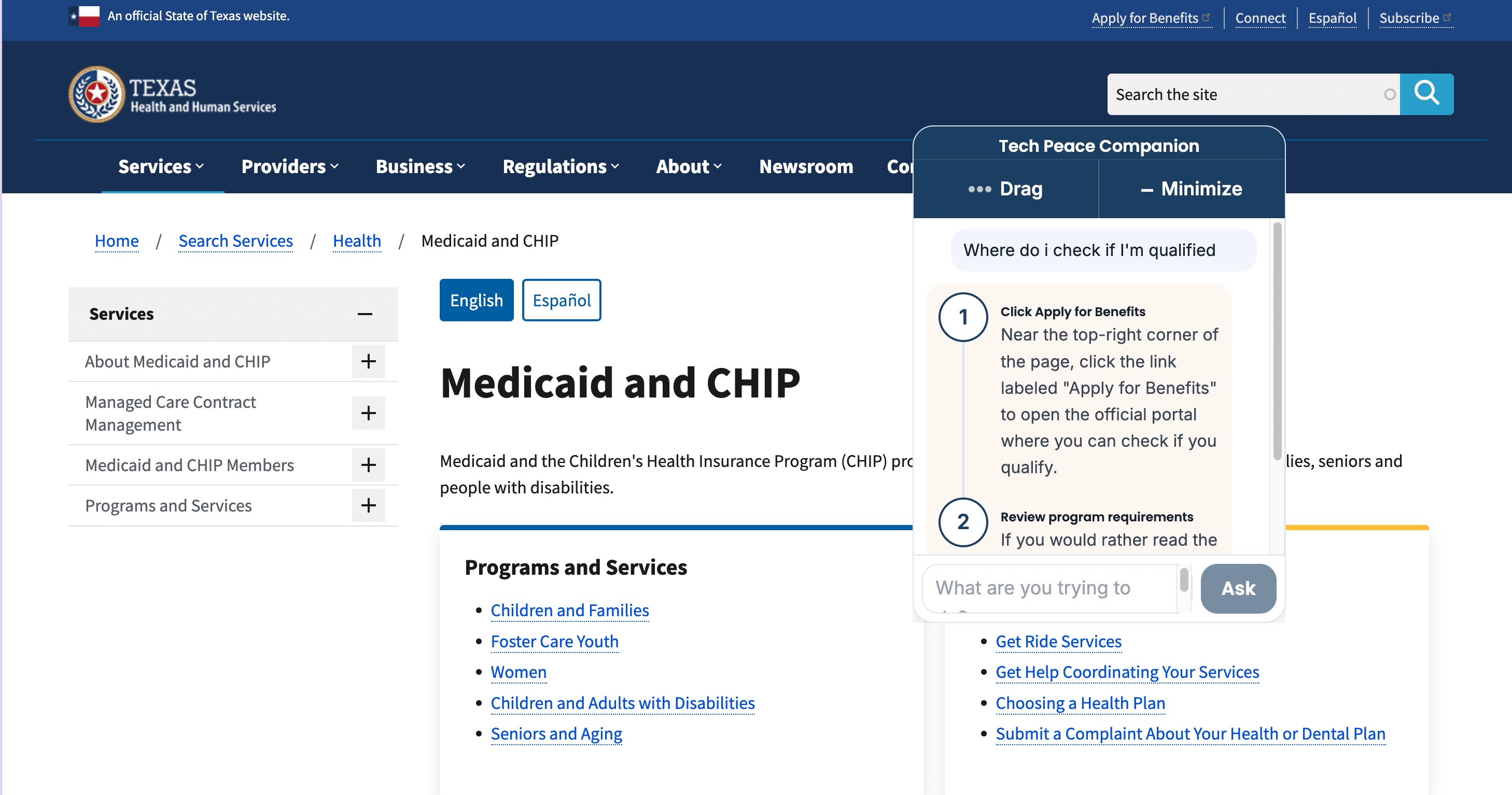
Tap the small badge in the corner of any page and ask what you're trying to do — "how do I view videos I watched yesterday?" or "where do I check if I qualify?" It reads the page you're on and answers with 3–5 short, numbered steps written for that exact page, not a generic help article.
See it in action
The same small widget, two different pages
The same promise as the rest of Tech Peace
What it can see, and what it never does
What it checks
- The web address and visible text of the page you are on, to spot scam warning signs
- A stripped-down summary of the page (links, buttons, visible text) only when it needs a second opinion, or when you ask a question
- Whether you are signed in, so it knows which member is asking
What it never does
- Never reads or stores your passwords
- Never sends images, scripts, or anything typed into other tabs
- Never shows a blocking pop-up on a page it thinks is safe
- Never sells or shares your data with advertisers
Full details — including exactly what is stored, for how long, and who it is shared with — are in the Online Companion privacy policy.
Straight answers
Questions people ask before installing
The same plain-language approach the rest of Tech Peace uses, applied to this extension's permissions and data.
Why does it need permission to read every website I visit?
Both of its jobs only make sense if it can run on whatever page you happen to be on: checking for scam warning signs, and reading your question about the page you are currently looking at. It is not limited to a fixed list of sites, because scams and confusing pages can show up anywhere. It reads page text and links to do that checking — it does not watch you browse, and it does not keep a history of the sites you visit.
Does it send everything I look at back to Tech Peace?
No. Most pages are checked instantly on your own device and nothing is sent anywhere. Tech Peace is only contacted when a page looks ambiguous enough to need a second opinion, or when you tap the badge and type a question — and even then, only a stripped-down summary of the page (links, buttons, and visible text, never images or your typing in other tabs) is sent, over a secure connection, to check against known scam lists and to write your step-by-step answer.
Why does it need the "alarms" permission?
Only to keep you signed in. Chrome shuts down an idle extension in the background, and a normal timer would be lost along with your session, logging you out without warning. The alarm permission lets the extension check every few minutes whether your sign-in needs refreshing, so you are not asked to log in over and over through the day.
What does it store on my computer?
Your sign-in session (never your password), and a short-lived note of which sites you've already checked today so it doesn't re-check them. That cache clears itself after 24 hours. Nothing is kept forever, and nothing is sold or shared with advertisers — see the full privacy policy for specifics.
Does it cost anything?
The extension is free for any signed-up Tech Peace member — it is not limited to a particular membership tier. You do need to sign in with your Tech Peace account for the scam-checking and chat features; without signing in, it still runs basic on-device checks, but cannot reach Tech Peace's servers for a second opinion or answer questions.
Is it safe for someone who is not confident with technology?
That is who it is built for. It never interrupts you on a page that looks fine, it never shows a blocking pop-up, and every warning and every step-by-step answer is written in plain language, not technical jargon. You can always minimize it back down to a small badge in the corner.
Not a member yet?
The Online Companion is free for every signed-up Tech Peace member. Contact us or call 972-885-8579 and we will get you set up.